 and drag a text label on the screen.
 and drag an edit box next to the text tool.
 and drag a button below the text fields.
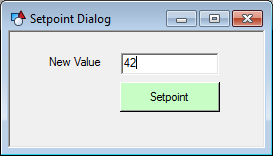
The following example shows how to create a simple setpoint screen for changing the value of a specific point.
See SetPoint Button Tool for more information about adding a configurable SetPoint button to a screen.
To Build a Setpoint Screen
and drag a text label on the screen. and drag an edit box next to the text tool. and drag a button below the text fields.
 icon in the Layout toolbar to open the script window for the screen.
|
Sub btnSetPoint_EventClick() Dim This : Set This = btnSetPoint Dim strPoint strPoint = "CYGDEMO.UIS:RTU1_PSTATIC" Err.Clear
'Enable live mode (required for setpoint function) EnableLiveMode(True)
'Check text box value and execute setpoint if valid If Not IsNumeric(txtValue.Text) Then MsgBox "Enter a numeric value." Else On Error Resume Next SetPoint strPoint, CDbl(txtValue.Text)
'Check Err object for possible errors If Err.Number <> 0 Then MsgBox "Setpoint failed." Exit Sub End If
MsgBox "Setpoint of " + strPoint + " succeeded." End If
End Sub |

|
|
|

